Subscribe Us

thumbnail

What is polymorphism and its example?

Polymorphism in c++


What is polymorphism and its example?


Polymorphism is an essential concept in object-oriented programming (OOP), a programming paradigm that is widely used today. In OOP, we build software by modeling objects that interact with each other. Polymorphism is a feature of OOP that allows objects to take multiple forms, meaning that they can behave in different ways depending on the context in which they are used.


Put simply, polymorphism is the ability of an object to appear in many forms. This means that objects can be used in various ways in different parts of a program. Polymorphism makes it easier to write flexible and reusable code, as it allows developers to create code that can adapt to changing requirements.


In this article, we will explore the concept of polymorphism and its types, along with some examples. We will also discuss the advantages of using polymorphism and how it can help developers write more maintainable and extensible code. Whether you are a seasoned developer or just starting, understanding polymorphism will help you become a better programmer.


Types of Polymorphism


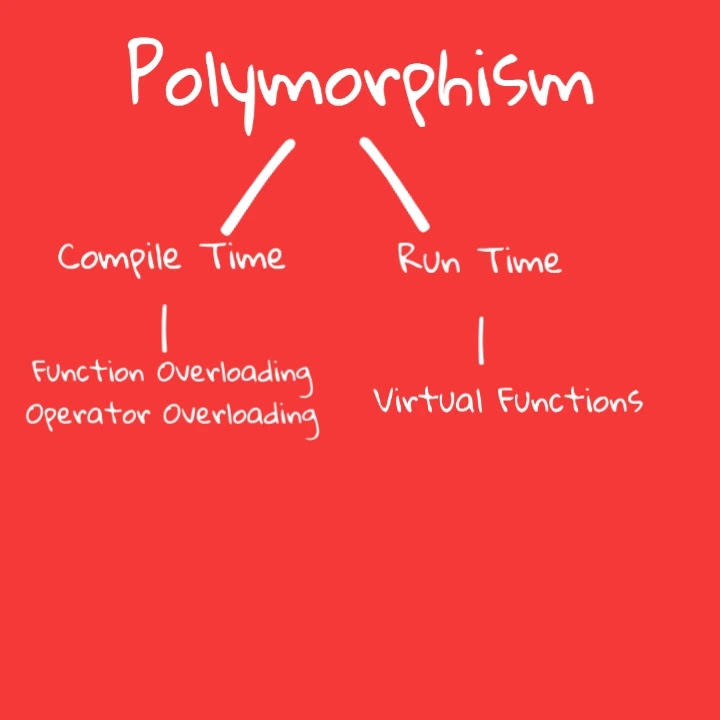
Polymorphism is ordered into two types: compile-time polymorphism and run-time polymorphism. Let's take a closer look at each of these types along with their subtypes:


A. Compile-time Polymorphism


Compile-time polymorphism, also known as static polymorphism, is a type of polymorphism that occurs at compile time. It is accomplished through function overloading and operator overloading.

1. Function Overloading 


Function overloading is a type of polymorphism that allows us to define multiple functions with the same name but different parameters. The compiler determines which function to call based on the number, type, and sequence of arguments passed to it.


For example, consider a calculator program that performs addition of two integers, two floats, and two doubles. Instead of creating separate functions for each data type, we can use function overloading to create a single function named "add" that can handle all the data types.


2. Operator Overloading 


Operator overloading is a type of polymorphism that allows operators such as +, -, *, and / to be used with objects of user-defined classes. It is done by overloading the operators with class-specific implementations.


For example, consider a class named "Complex" that represents complex numbers. We can overload the + operator to add two complex numbers.


B. Run-time Polymorphism


Run-time polymorphism, also known as dynamic polymorphism, is a type of polymorphism that occurs at runtime. It is achieved through virtual functions and dynamic polymorphism.


1. Virtual Functions 


Virtual functions are functions that are declared in a base class and can be overridden in the derived class. They allow the correct function to be called based on the actual type of the object.


For example, consider a class named "Shape" with a virtual function named "area". We can create derived classes like "Circle" and "Rectangle" that implement the "area" function in their own way.


2. Dynamic Polymorphism 


Dynamic polymorphism is achieved through pointers and references. It allows objects to be treated as their base class or derived class, depending on the context. This type of polymorphism is used when we don't know the actual type of the object at compile time.


For example, consider a program that has a base class named "Animal" and derived classes like "Dog" and "Cat". We can use dynamic polymorphism to create an array of animal objects and call their respective functions.


Examples of Polymorphism


Polymorphism can be found in various real-world scenarios, and here are some examples to illustrate the concept:


A. Function Overloading


Consider a program that has a function named "print" to print different data types such as integers, floats, and strings. Instead of creating separate functions for each data type, we can use function overloading to create a single function named "print" that can handle all the data types.


void print(int num) {

cout << "The integer value is: " << num << endl;

}


void print(float num) {

cout << "The float value is: " << num << endl;

}


void print(string str) {

cout << "The string is: " << str << endl;

}


Now we can call the print function with different data types, and the compiler will choose the appropriate function to call based on the argument's data type.


B. Operator Overloading


Consider a class named "Vector" that represents a vector in 2D space. We can overload the + operator to add two vectors.


class Vector {

public:

int x, y;

Vector operator+ (const Vector& v) {

Vector result;

result.x = x + v.x;

result.y = y + v.y;

return result;

}

};


int main() {

Vector a, b, c;

a.x = 1;

a.y = 2;

b.x = 3;

b.y = 4;

c = a + b;

cout << "The result is: (" << c.x << ", " << c.y << ")" << endl;

return 0;

}


Here we have overloaded the + operator to add two vectors by defining a function that takes a vector object as an argument and returns a vector object. Now we can use the + operator to add two vectors, just like we add two integers or floats.


C. Virtual Functions


Consider a program that has a base class named "Shape" and derived classes like "Circle" and "Rectangle". The base class has a virtual function named "area" that is implemented differently in each derived class.


class Shape {

public:

virtual float area() {

return 0;

}

};


class Circle: public Shape {

public:

float radius;

Circle(float r) {

radius = r;

}

float area() {

return 3.14 * radius * radius;

}

};


class Rectangle: public Shape {

public:

float length, breadth;

Rectangle(float l, float b) {

length = l;

breadth = b;

}

float area() {

return length * breadth;

}

};


int main() {

Shape* shape;

Circle circle(5);

Rectangle rectangle(3, 4);

shape = &circle;

cout << "Area of circle is: " << shape->area() << endl;

shape = &rectangle;

cout << "Area of rectangle is: " << shape->area() << endl;

return 0;

}


Here we have used virtual functions to implement polymorphism. We have a base class named "Shape" with a virtual function named "area". The derived classes "Circle" and "Rectangle" override this function to calculate their respective areas. We create objects of these derived classes and assign them to a pointer of the base class "Shape." We then call the "area" function using the base class pointer, and the appropriate


Advantages of Polymorphism


Polymorphism offers several benefits that make it a useful feature in programming, including:


A. Code Reusability


Polymorphism enables the reuse of existing code by allowing the same function or method to be used with different data types. This helps to reduce the amount of code that needs to be written, making it easier to maintain and update code.


B. Flexibility


Polymorphism makes code more flexible by allowing different implementations of the same function or method to be used based on the context. This allows for greater customization and more tailored solutions to specific problems.


C. Increased Readability


Polymorphism can make code more readable and easier to understand by reducing the complexity of the code. This is achieved by using the same function or method name for different implementations, which makes the code more streamlined and less cluttered.


D. Efficient Memory Usage


Polymorphism can help to reduce memory usage by using pointers or references to the base class rather than creating objects of the derived class. This is achieved by taking advantage of the fact that derived classes can be treated as their base class, which reduces the amount of memory needed to store objects.


E. Improved Maintainability


Polymorphism can help to improve the maintainability of code by reducing the number of errors that can occur due to duplicated code. By using polymorphism to reuse code, there are fewer lines of code to maintain, making it easier to find and fix errors. This can lead to a reduction in development time and costs.


Conclusion


Polymorphism is a fundamental concept in object-oriented programming that allows the same function or method to be used with different data types. This powerful feature enables developers to write more flexible, efficient, and maintainable code by reusing existing code and customizing solutions to specific problems.


In this article, we explored the definition of polymorphism and its two main types: compile-time and runtime polymorphism. We also discussed several examples of polymorphism, including function overloading, operator overloading, and virtual functions.


Moreover, we highlighted the advantages of using polymorphism in programming, including code reusability, flexibility, increased readability, efficient memory usage, and improved maintainability. These benefits make polymorphism an essential tool in developing software applications that are both efficient and cost-effective.


In conclusion, understanding the concept of polymorphism is crucial for any developer who wants to write efficient, maintainable, and scalable code. By mastering the art of polymorphism, developers can unlock the full potential of object-oriented programming and build better software applications that meet the needs of their users.

thumbnail

Data types in c++

Data types in c++


Data types in c++


Data types play a crucial role in programming, as they define the type of data a variable can store and the operations that can be performed on it. In C++, data types are an essential aspect of the language, providing the means to store and manipulate data in a manner that is both efficient and effective.

C++ supports a wide range of built-in data types, including integers, floating-point numbers, characters, and booleans. In addition, C++ also allows for the creation of user-defined data types, such as enumerated types, structured types, and unions, which provide even greater control and flexibility when working with data.

Type conversion is another important aspect of data types in C++, as it allows for the conversion of one data type to another, making it possible to perform operations on variables of different data types. Understanding type conversion and the different techniques used to perform it, such as type casting, type promotion, and type demotion, is crucial for efficient and effective programming in C++.

In this article, we will take a closer look at data types in C++, examining the built-in data types, user-defined data types, and type conversion in detail. Our goal is to provide you with a comprehensive understanding of the importance of data types in C++ and how to use them to achieve the results you desire.


Built-in Data Types in C++


C++ provides several built-in data types that can be used to store various types of data. These built-in data types are the basic building blocks of any C++ program, and it is essential to understand their characteristics and how they are used.

1. Integer Types:


Short: The short data type is used to store small integer values. It takes up two bytes of memory and can store a value ranging from -32,768 to 32,767.


Int: The int data type is used to store integer values. It takes up four bytes of memory and can store a value ranging from -2,147,483,648 to 2,147,483,647.


Long: The long data type is used to store larger integer values. It takes up four bytes of memory and can store a value ranging from -2,147,483,648 to 2,147,483,647.


Long Long: The long long data type is used to store very large integer values. It takes up eight bytes of memory and can store a value ranging from -9,223,372,036,854,775,808 to 9,223,372,036,854,775,807.


2. Floating-Point Types:


Float: The float data type is used to store single-precision floating-point values. It takes up four bytes of memory and can store values with a precision of up to 7 decimal places.


Double: The double data type is used to store double-precision floating-point values. It takes up eight bytes of memory and can store values with a precision of up to 15 decimal places.


Long Double: The long double data type is used to store extended-precision floating-point values. It takes up ten bytes of memory and can store values with a precision of up to 19 decimal places.


3. Character Types:


Char: The char data type is used to store character values, such as letters, numbers, and symbols. It takes up one byte of memory and can store a single character.


4. Boolean Type:


Bool: The bool data type is used to store logical values, such as true or false. It takes up one byte of memory and can store a value of either true or false.


It is essential to choose the appropriate data type based on the type of data being stored and the operations that will be performed on it. For example, using a short data type to store a large integer value could result in data loss, while using a long double data type to store a simple integer value could result in unnecessary memory usage.


By understanding the different built-in data types in C++, you can make informed decisions about which data type to use for a given scenario, resulting in more efficient and effective programming.


● What is advantage and disadvantage of C++?


User-defined Data Types in C++


User-defined data types in C++ are data types created by the programmer to better suit the needs of their specific project or program. They are created using either structures, classes, unions, or enumerated data types. These user-defined data types offer a way to group data together into a single unit and provide a way to better organize and manage data within a program.


1. Enumerated Data Type


An enumerated data type is a user-defined data type that allows the programmer to assign a set of named integer constants to a variable. It provides a way to limit the possible values of a variable and make code easier to read by replacing numeric constants with descriptive names.


2. Structure Data Type


A structure is a user-defined data type that allows the programmer to group together different data types into a single unit. Each element within a structure is referred to as a member. Structures are commonly used to represent real-world objects or concepts.


3. Union Data Type


A union is a user-defined data type that allows the programmer to use the same memory location to store multiple variables of different data types. Unions provide a way to save memory, as only the memory required for the largest member is allocated.


4. Class Data Type


A class is a user-defined data type that provides a way to encapsulate data and functions into a single unit. Classes can have member variables and member functions, and objects are created from classes to access and manipulate the data stored within a class. Classes also provide a way to define object-oriented concepts such as inheritance, polymorphism, and encapsulation.


Overall, user-defined data types provide a way to group data together, better manage data within a program, and provide more meaningful and organized code.


● Inheritance in C++


Derived Data Types in C++


Derived data types in C++ are data types that are derived from the primitive data types. These data types offer additional functionality and versatility compared to the primitive data types. There are four main derived data types in C++:


1. Array Data Type: 

An array is a assortment of elements of the same data type. The elements are stored in contiguous memory locations and can be gotten to using an index. Arrays can be one-dimensional, two-dimensional, or multi-dimensional. In C++, arrays are declared using the syntax: 


data_type array_name[array_size];


2. Pointer Data Type: 


Pointers are variables that hold memory addresses of other variables. They are used to dynamically allocate memory and perform operations such as dynamic memory allocation and passing function arguments by reference. Pointers are declared using the syntax: 


data_type *pointer_name;


3. Function Data Type: 


Functions are blocks of code that perform a explicit task. Functions can return a value or not and can accept zero or more arguments. In C++, functions are declared using the syntax: 


return_type function_name(parameter_list) { /* function body */ }


4. Reference Data Type: 


References are variables that refer to another variable. They provide an alternative way to pass function arguments by reference, and also simplify pointer usage in certain cases. References are declared using the syntax: 


data_type &reference_name = original_variable;

Overloading in C++


Conclusion


In C++, data types are a way to specify what type of data (integer, floating-point, character, etc.) a variable can store. The basic data types in C++ include int (integer), float (floating-point number), double (double-precision floating-point number), char (character), and bool (boolean). In addition to these basic data types, C++ also provides several other data types such as arrays, pointers, structures, and classes for more complex data structures.


It is important to choose the appropriate data type for a variable, as this affects both the size of the memory allocation for the variable and the range of values that can be stored. The choice of data type can also affect the precision and accuracy of calculations, especially in the case of floating-point numbers.


In conclusion, understanding data types and choosing the appropriate data type for a variable is a fundamental aspect of programming in C++. Proper use of data types helps ensure the efficiency, accuracy, and robustness of C++ programs.

thumbnail

Overloading in c++

Overloading in c++


Overloading in c++


Definition of Overloading in C++ 

Overloading in C++ refers to the use of the same name for multiple functions, operators, or constructors within the same scope. This allows multiple functions, operators, or constructors to be defined with the same name but with different parameters. This can help to increase the readability and maintainability of code, as well as decreasing the amount of code that needs to be written.


Importance of Overloading in C++

programming Overloading is an important feature in C++ programming, as it allows for greater flexibility and abstraction in coding. By using overloading, a programmer can create functions, operators, or constructors that can perform a variety of tasks using the same name, making the code easier to understand and decreasing the amount of code that needs to be written. Overloading can also be used to create overloaded operators that perform mathematical operations, as well as overloaded functions that perform specific tasks based on the type or number of parameters.


Brief overview of the article 

This article will provide a comprehensive overview of overloading in C++, including the different types of overloading, the rules for overloading, and best practices for using overloading in C++ programming. The article will also provide examples and explanations to support each sub-topic and to help readers understand the concepts of overloading in C++.


● What is C++ language called?


Types of Overloading in C++


1. Operator Overloading


Definition of operator overloading 

Operator overloading in C++ refers to the process of redefining the behavior of existing operators, such as +, -, *, /, etc., so that they can be used with custom data types. This allows for the creation of mathematical operations that can be performed on custom data types, making the code more readable and easier to maintain.


Advantages of operator overloading 

Some of the benefits of operator overloading include improved readability, reduced complexity of code, and the ability to perform mathematical operations on custom data types. This makes it easier to write and maintain code, as well as to understand the operations that are being performed on custom data types.


How to overload operators in C++ 

In C++, operators can be overloaded using operator functions, which are functions that are declared with the "operator" keyword. These functions are defined to perform specific tasks, such as adding or subtracting two custom data types, and can be overloaded using different parameter lists or types. The syntax for overloading an operator in C++ is as follows:


class CustomDataType {

public:

CustomDataType operator+(const CustomDataType& other) {

// code to perform addition of two custom data types

}

};


2. Function Overloading


Definition of function overloading 

Function overloading in C++ refers to the process of defining multiple functions with the same name, but with different parameters. This allows for the creation of functions that can perform a variety of tasks, based on the type or number of parameters that are passed to the function.


Advantages of function overloading 

Function overloading can improve code readability, reduce code complexity, and allow for the creation of flexible and reusable functions. By using function overloading, a programmer can create functions that can perform multiple tasks using the same name, making it easier to understand and maintain the code.


How to overload functions in C++ 

In C++, functions can be overloaded by declaring multiple functions with the same name but with different parameter lists or types. The compiler will choose the appropriate function to call based on the type and number of arguments passed to the function. The syntax for overloading a function in C++ is as follows:


int add(int a, int b) {

return a + b;

}


float add(float a, float b) {

return a + b;

}


3. Constructor Overloading

Definition of constructor overloading

 Constructor overloading in C++ refers to the process of defining multiple constructors for a class, with each constructor having a different parameter list. This allows for the creation of constructors that can be used to initialize objects in a variety of ways, based on the type or number of parameters that are passed to the constructor.


Advantages of constructor overloading

 Constructor overloading can improve code readability, reduce code complexity, and allow for the creation of flexible and reusable constructors. By using constructor overloading, a programmer can create constructors that can initialize objects in different ways using the same class name, making it easier to understand and maintain the code.


How to overload constructors in C++ 

In C++, constructors can be overloaded by declaring multiple constructors with different parameter lists or types. The compiler will choose the appropriate constructor to call based on the parameters that are passed to the constructor when an object is created.


● What is advantage and disadvantage of C++?


Rules for Overloading in C++


A. Overloading Resolution

Definition of overloading resolution:-Overloading resolution refers to the process by which the compiler determines which overloaded function, operator, or constructor to call based on the arguments that are passed. This process is performed at compile-time and ensures that the correct function, operator, or constructor is called based on the arguments that are passed.


How overloading resolution works:- Overloading resolution works by examining the arguments that are passed to the function, operator, or constructor, and comparing them to the parameters of each overloaded function, operator, or constructor. The compiler then chooses the function, operator, or constructor that has the best match for the arguments that are passed.


B. Overloading with User-Defined Data Types


Definition of user-defined data types:- User-defined data types are data types that are created by the programmer. These data types can be used in place of built-in data types, and can be used with overloaded functions, operators, and constructors.

Overloading with user-defined data types:- Overloading can be used with user-defined data types to provide more intuitive and flexible behavior for these data types. For example, if a user-defined data type represents a complex number, the + operator can be overloaded to perform addition of complex numbers.

C. Overloading with Constants


Definition of constants:- Constants are values that do not change during the execution of a program. Constants can be defined using the const keyword in C++.

Overloading with constants:- Overloading can be used with constants to provide different behavior for functions, operators, and constructors based on whether the arguments are constants or not. For example, a function that adds two numbers can be overloaded to provide different behavior for adding a constant number to a non-constant number.

D. Overloading with References and Pointers


Definition of references and pointers:- References and pointers are data types in C++ that allow a programmer to refer to a value or an object directly, rather than indirectly through a copy of the value or object.

Overloading with references and pointers:- Overloading can be used with references and pointers to provide different behavior for functions, operators, and constructors based on whether the arguments are references or pointers. For example, a function that adds two numbers can be overloaded to provide different behavior for adding a reference to a number to a pointer to a number.

E. Overloading with Default Arguments 


Definition of default arguments:- Default arguments are arguments that are automatically provided to a function, operator, or constructor if no value is passed for that argument.

Overloading with default arguments:- Overloading can be used with default arguments to provide different behavior for functions, operators, and constructors based on the number of arguments that are passed. For example, a function that adds two numbers can be overloaded to provide a default value for the second number if only one number is passed.


Best Practices for Overloading in C++


A. Maintain Consistency

Importance of consistency:- Consistency is important when overloading functions, operators, and constructors in C++. This helps to ensure that the behavior of these entities is intuitive and predictable for the users of the code.


How to maintain consistency:- To maintain consistency when overloading, it is important to follow the same conventions and behaviors as the built-in operators and functions in C++. This includes using the same operator symbols and precedence rules, as well as using the same return types and argument types.


B. Provide Intuitive and Flexible Behavior


Importance of intuitive behavior:- Intuitive behavior is important when overloading functions, operators, and constructors in C++. This helps to ensure that the code is easy to understand and use for the users of the code.


How to provide intuitive behavior:- To provide intuitive behavior when overloading, it is important to consider the context in which the overloaded entities will be used. For example, if a user-defined data type represents a complex number, the + operator should be overloaded to perform addition of complex numbers, just as the + operator performs addition of built-in data types.


C. Avoid Overloading That Leads to Ambiguity


Definition of ambiguity:- Ambiguity occurs when the compiler is unable to determine which overloaded function, operator, or constructor to call based on the arguments that are passed.


How to avoid ambiguity:- To avoid ambiguity when overloading, it is important to ensure that each overloaded entity has a unique set of parameters. This can be achieved by using different parameter types, different numbers of parameters, or different combinations of parameter types and numbers of parameters.


D. Use Overloading Carefully with Conversion Operators


Definition of conversion operators:- Conversion operators are operators that are overloaded to convert one data type to another data type.


Use of conversion operators:- Conversion operators should be used carefully when overloading, as they can have unexpected and unintended effects on the behavior of the code. For example, a conversion operator that converts a user-defined data type to an int may cause unexpected behavior if the user-defined data type cannot be represented as an int.


E. Document Overloading Behavior


Importance of documentation:-Documentation is important when overloading functions, operators, and constructors in C++. This helps to ensure that the behavior of the overloaded entities is clear and understandable for the users of the code.


How to document overloading behavior:-
To document overloading behavior, it is important to provide clear and concise descriptions of the behavior of each overloaded entity. This should include a description of the arguments that the entity can take, the return type, and any important behaviors or restrictions.


Conclusion

Overloading in C++ is a powerful feature that allows developers to create intuitive and flexible behavior for their user-defined data types. However, it is important to use overloading carefully and to follow best practices, such as maintaining consistency, providing intuitive behavior, avoiding ambiguity, using conversion operators carefully, and documenting overloading behavior. By following these best practices, developers can create well-designed and robust code that is easy to use and understand for their users.

thumbnail

Inheritance in C++

Inheritance in C++


Definition of inheritance in programming: 

Inheritance is a fundamental concept in object-oriented programming that allows developers to create new classes that inherit properties and behavior from existing classes.


Explanation of inheritance in C++: 

C++, being an object-oriented programming language, supports inheritance as a mechanism for reusing code and creating new classes that are based on existing ones. Inheritance allows a new class to inherit properties, attributes, and methods of an existing class and extend or modify them to create a new, more specialized class.


Brief history of inheritance in C++: 

C++ was developed by Bjarne Stroustrup in the early 1980s as an extension of the C programming language. It was designed to provide support for object-oriented programming concepts like inheritance, encapsulation, and polymorphism. Over the years, C++ has become one of the most widely used programming languages, and its support for inheritance has made it an essential tool for developing complex software systems.


What is C++ language called?


Types of Inheritance in C++

 Inheritance in C++


1. Single Inheritance: 

Single inheritance is the simplest form of inheritance where a derived class inherits the properties and behaviors of a single base class. In single inheritance, the derived class can access the public and protected members of the base class, but not the private members.


2. Multiple Inheritance: 

Multiple inheritance is a form of inheritance where a derived class inherits properties and behaviors from more than one base class. This allows the derived class to inherit the properties of multiple base classes and create a more specialized class that combines the properties of multiple base classes.


3. Multi-level Inheritance: 

Multi-level inheritance is a form of inheritance where a class can inherit from another derived class. This allows for a hierarchical inheritance structure where a derived class can inherit properties from multiple levels of base classes, creating a more complex inheritance hierarchy.


4. Hierarchical Inheritance: 

Hierarchical inheritance is a form of inheritance where multiple derived classes inherit from a single base class. This allows multiple classes to inherit the properties of the base class and create a hierarchy of classes that share common properties and behaviors.


5. Hybrid Inheritance: 

Hybrid inheritance is a combination of multiple inheritance and single inheritance. In hybrid inheritance, a derived class inherits properties and behaviors from multiple base classes as well as from a single base class, allowing for a more complex and flexible inheritance structure.


It's important to note that C++ supports all of these types of inheritance, and the choice of which type to use depends on the specific requirements of the project. Understanding the different types of inheritance in C++ is crucial to effectively designing and implementing complex software systems.


What is advantage and disadvantage of C++?


Syntax and Keywords Used in C++ Inheritance


Syntax of inheritance in C++: 

The syntax for inheritance in C++ is relatively simple. To declare a derived class, the derived class name is followed by a colon and the base class name, and the keyword "public" is used to specify the inheritance type (public, protected, or private). 

For example:

class DerivedClass: public BaseClass

{

    // members of the derived class

};


Keywords used in inheritance in C++: 


The following keywords are commonly used in inheritance in C++:


1. class: used to declare a class in C++


2. public: specifies that the members of the base class are accessible by the derived class and any code that uses the derived class.


3. protected: specifies that the members of the base class are accessible by the derived class and any derived classes, but not by other code that uses the derived class.


4. private: specifies that the members of the base class are only accessible by the derived class, and not by any derived classes or other code that uses the derived class.


Explanation of the use of each keyword in inheritance: 

The choice of which keyword to use in inheritance depends on the intended level of access to the members of the base class by the derived class and any other code that uses the derived class. The public keyword provides the most permissive level of access, while the private keyword provides the most restrictive level of access. The protected keyword provides a compromise between the two, allowing access to members of the base class by the derived class and any derived classes, but not by other code that uses the derived class.


Advantages and Disadvantages of Inheritance in C++


Advantages of Inheritance in C++:

1. Reusability of code: Inheritance allows developers to reuse existing code by creating new classes that inherit properties and behaviors from existing classes. This reduces the amount of redundant code and makes it easier to maintain and update the code.


2. Extensibility: Inheritance allows developers to create new classes that extend or modify the properties and behaviors of existing classes. This makes it easier to create specialized classes that are tailored to specific needs and requirements.


3. Polymorphism: Inheritance allows for polymorphism, which is the ability of objects of different classes to be treated as objects of a common base class. This makes it easier to write code that can work with objects of different classes in a generic way.

4. Code organization: Inheritance allows developers to create a hierarchical structure of classes that reflects the relationships between the classes. This makes it simpler to understand and maintain the code.


Disadvantages of Inheritance in C++:

1. Complexity: Inheritance can add complexity to the code, especially when multiple levels of inheritance or complex inheritance hierarchies are involved.

2. Fragility: Changes made to a base class can have unintended consequences for derived classes. This can lead to bugs and make the code more difficult to maintain.

3. Over-reliance on inheritance: Over-reliance on inheritance can lead to overly complex class hierarchies that are difficult to understand and maintain. In some cases, inheritance may not be the best solution, and other techniques, such as composition, may be more appropriate.


Examples of Inheritance in C++


Example 1: Basic Inheritance


#include <iostream>
using namespace std;


// Base class Shape
class Shape {
public:
void setWidth(int w) {
width = w;
}
void setHeight(int h) {
height = h;
}
protected:
int width;
int height;
};


// Derived class Rectangle
class Rectangle: public Shape {
public:
int getArea() {
return (width * height);
}
};


int main(void) {
Rectangle Rect;

Rect.setWidth(5);
Rect.setHeight(7);


// Print the area of the object.
cout << "Total area: " << Rect.getArea() << endl;


return 0;
}


Example 2: Multiple Inheritance


#include <iostream>
using namespace std;


// Base class Shape
class Shape {
public:
void setWidth(int w) {
width = w;
}
void setHeight(int h) {
height = h;
}
protected:
int width;
int height;
};


// Base class PaintCost
class PaintCost {
public:
int getCost(int area) {
return area * 70;
}
};


// Derived class Rectangle
class Rectangle: public Shape, public PaintCost {
public:
int getArea() {
return (width * height);
}
};


int main(void) {
Rectangle Rect;
int area;

Rect.setWidth(5);
Rect.setHeight(7);


area = Rect.getArea();

// Print the area of the object.
cout << "Total area: " << Rect.getArea() << endl;


// Print the total cost of painting
cout << "Total paint cost: $" << Rect.getCost(area) << endl;


return 0;
}


Example 3: Hybrid Inheritance (Through Multiple and Multilevel Inheritance)


#include <iostream>
using namespace std;


// Base class Shape
class Shape {
public:
void setWidth(int w) {
width = w;
}
void setHeight(int h) {
height = h;
}
protected:
int width;
int height;
};


// Derived class PaintCost
class PaintCost {
public:
int getCost(int area) {
return area * 70;
}
};


// Derived class Rectangle
class Rectangle: public Shape {
public:
int getArea() {
return (width * height);
}
};


// Derived class Result, inherits from Rectangle and PaintCost
class Result: public Rectangle, public PaintCost {
public:
int getTotalCost(int area) {
return getCost(area);
}
};


Conclusion


Inheritance in C++ is a fundamental concept in object-oriented programming (OOP) that allows a new class to be created by inheriting properties and behaviors from an existing class. It provides a way to extend and reuse existing code, making it more efficient and organized. The new class, called a derived class, inherits all the member variables and member functions of the base class, and can also add new member variables and functions. Inheritance promotes code reuse, which helps to reduce code duplication and increase the overall maintainability of the codebase.
thumbnail

What is C++ language called?

What is C++ language called


What is C++ language called?


Definition of C++ Language: 

C++ is a general-purpose, object-oriented programming language that was first introduced in 1985 by Bjarne Stroustrup. It is an extension of the C programming language and provides additional features such as classes, objects, and templates. 


Brief History of C++: 

C++ was designed to provide more efficient and effective ways of writing software. Stroustrup wanted to add object-oriented programming capabilities to the C language while still retaining its efficiency and low-level access to system resources. Since its introduction, C++ has become one of the most widely used programming languages in the world. 


Significance of C++ in Today's World: 

C++ is used in a variety of applications, including gaming, scientific and mathematical simulations, and web development. It is a preferred language for developing operating systems, system software, and embedded systems. C++ is also commonly used in the financial industry for high-frequency trading and risk management applications. Due to its popularity and widespread use, a strong community of developers and support resources have emerged, making it a valuable skill for professionals in the technology industry.


Characteristics of C++


1. Object-Oriented Programming: 

C++ supports object-oriented programming, which is a programming paradigm based on the concept of objects. Objects are instances of classes, which are user-defined data types that encapsulate data and behavior. This makes it easier to write maintainable and reusable code, as well as to model real-world scenarios. 


2. C++ as a High-Level Language: 

Although C++ provides low-level access to system resources, it is considered a high-level language due to its abstraction from the underlying hardware and its ease of use compared to assembly language. C++ also provides features such as automatic memory management, which simplifies the process of writing code. 


3. C++ as a Cross-Platform Language: 

C++ is a cross-platform language, meaning that code written in C++ can run on multiple operating systems and hardware platforms with minimal modification. This makes it an ideal choice for developing applications that need to run on a variety of systems. Additionally, the Standard Template Library (STL) in C++ provides a collection of algorithms and data structures that can be used on any platform, further enhancing its portability.


Applications of C++


1. Gaming Industry: 

C++ is widely used in the gaming industry to develop video games and other interactive applications. The language's combination of high performance, object-oriented programming, and cross-platform capabilities makes it an ideal choice for game development. Major gaming engines such as Unreal Engine and Unity use C++ as their primary programming language. 


2. Scientific and Mathematical Applications:

C++ is also used in scientific and mathematical simulations, particularly in fields such as physics, engineering, and finance. The language's speed and efficiency make it well-suited for these types of applications, where large amounts of data need to be processed quickly. 


3. Web Development and E-commerce: 

C++ is used in web development, particularly in developing server-side applications and e-commerce websites. The language's performance and ability to handle multiple concurrent connections make it well-suited for these types of applications, where response time is critical. Additionally, the use of object-oriented programming in C++ allows for the development of scalable and maintainable applications.


Advantages of using C++


1. Speed and Efficiency: 

C++ is known for its speed and efficiency, making it well-suited for applications that require a lot of computational power. The language provides low-level access to system resources, allowing for fine-grained control over how the application uses memory and other resources. Additionally, C++ provides features such as inline functions and operator overloading, which can help to further improve performance. 


2. Large Community and Support: 

C++ has a large and active community of developers, who have created a wide range of resources, libraries, and tools for the language. This makes it easier for developers to find help and support, as well as to find existing code that can be used in their own projects. 


3. Scalability and Portability: 

C++'s support for object-oriented programming, combined with its cross-platform capabilities, makes it easy to write scalable and portable code. The language's modular design allows developers to write code in reusable components, which can be easily integrated into larger projects. Additionally, the use of templates in C++ allows for code to be written in a platform-independent manner, further enhancing its portability.


Conclusion


1. Summary of Key Points: 

C++ is a general-purpose, object-oriented programming language that provides high performance, low-level access to system resources, and cross-platform capabilities. It is widely used in a variety of applications, including gaming, scientific and mathematical simulations, and web development. Additionally, C++ has a large and active community of developers and a wide range of support resources. 


2. Importance of C++ in Today's World: 

C++ remains an important and widely-used language in today's technology industry, particularly in fields where high performance and low-level access to system resources are required. Its popularity and widespread use make it a valuable skill for technology professionals. 


3. Final Thoughts: 

C++ continues to evolve and expand, with the introduction of new features and enhancements in each version of the language. Despite its age, it remains a powerful and flexible language that is well-suited for a wide range of applications. Whether you are a seasoned developer or just starting out, C++ is a language worth considering for your next project.

thumbnail

What are the 4 types of Java applications?

What are the 4 types of Java applications?

What are the 4 types of Java applications?


Java is one of the most popular programming languages in the world and is widely used for developing various types of applications. Java applications are known for their scalability, reliability, and security, making them an ideal choice for businesses and organizations of all sizes. However, not all Java applications are created equal, and it's essential to understand the different types of Java applications and the benefits they offer.


In this article, we'll take a closer look at the four types of Java applications: standalone, web, mobile, and enterprise. By the end of this article, you'll have a solid understanding of the differences between these types of applications, and you'll be able to make an informed decision when choosing the right type of Java application for your project.


Definition of Java Applications

Java applications are computer software programs that are developed using the Java programming language. Java is known for its "write once, run anywhere" principle, meaning that Java applications can be run on any device that has a Java Virtual Machine (JVM) installed. This makes Java applications highly portable and accessible to a wide range of users.


Importance of Understanding the Different Types of Java Applications

Choosing the right type of Java application is crucial for the success of your project. Each type of Java application has its strengths and weaknesses, and it's essential to understand these before making a decision. By understanding the different types of Java applications, you'll be able to choose the right one for your project, ensuring that your application meets your specific needs and provides the best possible user experience.


Overview of the 4 Types of Java Applications

In this article, we'll take a closer look at the four types of Java applications: standalone, web, mobile, and enterprise. Standalone Java applications are self-contained programs that run on a user's computer. Web Java applications are hosted on a web server and run in a web browser. Mobile Java applications are designed to run on mobile devices, and enterprise Java applications are designed for use by large organizations. Each of these types of applications has its unique features and benefits, and we'll explore each in more detail in the following sections.


● What is Java language in simple words?


1. Standalone Java Applications


A standalone Java application is a self-contained program that runs on a user's computer. Standalone Java applications are not dependent on any external resources or servers, making them ideal for situations where an internet connection is not available or reliable. Standalone Java applications are also typically faster and more responsive than web-based applications, as they don't need to wait for data to be transmitted over a network.


Definition and Description 

Standalone Java applications are Java programs that run on a user's computer, independent of any external servers or resources. They are usually packaged as executable files and can be installed on a user's computer, allowing them to run the application without the need for an internet connection.


Examples of Standalone Java Applications

Some common examples of standalone Java applications include desktop productivity tools, such as text editors, media players, and image editors. Standalone Java applications can also be used for scientific or mathematical simulations, as well as for data analysis and visualization.


Advantages of Standalone Java Applications

There are several advantages to using standalone Java applications, including:


Offline access: Standalone Java applications can be used even when an internet connection is not available, making them ideal for situations where network connectivity is limited or unreliable.


● Speed and responsiveness: Standalone Java applications run on a user's computer, so they don't need to wait for data to be transmitted over a network. This results in faster performance and more responsive user interfaces.


● Security: Standalone Java applications are stored on a user's computer, which makes them less vulnerable to hacking and other security threats.


Challenges in Developing Standalone Java Applications 

While there are many advantages to developing standalone Java applications, there are also some challenges to consider, including:


● Development and maintenance: Standalone Java applications require more development and maintenance effort than web-based applications, as they need to be installed and updated on each user's computer.


● Deployment: Deploying standalone Java applications can be more difficult than deploying web-based applications, as users need to download and install the application on their computer.


● Testing: Testing standalone Java applications can be more complex than testing web-based applications, as there are many different types of computers and operating systems that the application needs to run on.


● what is class in java language


2. Web Java Applications


Web Java applications are Java programs that run on a web server and are accessed via a web browser. Web Java applications are hosted on a web server and are typically used for building dynamic, interactive websites and web applications. Web Java applications are accessible from anywhere in the world, making them ideal for businesses and organizations that need to reach a large, dispersed audience.


Definition and Description 

Web Java applications are Java programs that run on a web server and are accessed by users through a web browser. They are typically built using Java servlets, JavaServer Pages (JSP), and other Java technologies that are designed specifically for building web applications.


Examples of Web Java Applications 

Some common examples of web Java applications include online shopping websites, social networking sites, and web-based productivity tools. Web Java applications can also be used for building intranet applications, such as project management systems and company-wide knowledge management systems.


Advantages of Web Java Applications 

There are several advantages to using web Java applications, including:


● Accessibility: Web Java applications are accessible from anywhere in the world, as long as a user has an internet connection and a web browser.


● Scalability: Web Java applications can be scaled to accommodate large amounts of traffic and data, making them ideal for businesses and organizations that need to reach a large, dispersed audience.


● Maintenance: Web Java applications are typically easier to maintain than standalone Java applications, as they are stored on a centralized web server and can be updated from a single location.


Challenges in Developing Web Java Applications 

While there are many advantages to developing web Java applications, there are also some challenges to consider, including:


● Performance: Web Java applications can be slower than standalone Java applications, as they need to transmit data over a network and run in a web browser.


● Security: Web Java applications are vulnerable to hacking and other security threats, as they run on a web server that is accessible from the internet.


● Deployment: Deploying web Java applications can be more complex than deploying standalone Java applications, as they need to be hosted on a web server and configured correctly to ensure that they are accessible and secure.


● what is objects in java


3. Mobile Java Applications


Definition of Mobile Applications: 

A mobile application, also known as a mobile app, is a software application designed to run on a mobile device, such as a smartphone or tablet. Mobile apps are typically developed specifically for iOS, Android, or other mobile operating systems and can be downloaded through an app store.


How they work: 

Mobile apps are written in a programming language such as Java and are designed to work seamlessly on a small, touch-screen device. They are typically built to be highly responsive and user-friendly, allowing users to easily interact with the app through taps, swipes, and other gestures. Mobile apps can also access the device's hardware and software features, such as the camera, GPS, and accelerometer, to provide a more immersive and interactive experience for the user.


Advantages and disadvantages of Mobile Applications: 

Advantages of mobile applications include their convenience, accessibility, and ease of use. Mobile apps allow users to quickly access information and perform tasks on the go, without having to be tethered to a computer. They also offer a high level of engagement and interactivity, allowing users to personalize and customize their experience. However, there are also some disadvantages to mobile apps, such as the need for a consistent internet connection, security concerns, and the risk of app crashes or compatibility issues.


Mobile applications have become increasingly popular in recent years, with millions of apps available for download on app stores. From social media and entertainment to productivity and financial management, mobile apps offer a wide range of functions and services to meet the diverse needs of users. Whether you're looking to stay connected, be entertained, or stay on top of your schedule, there's likely a mobile app out there that can help.


● What are the four components of Java?


4. Enterprise Applications


Definition of Enterprise Applications:

Enterprise applications are software programs designed for use by large organizations to support their day-to-day business operations. These applications are typically customized to meet the specific needs of the organization and can be used to manage a wide range of tasks, including HR, finance, customer relationship management, and supply chain management.


How they work: 

Enterprise applications are usually built using Java or another enterprise-level programming language, and are designed to handle large amounts of data and support complex business processes. They are typically deployed on a company's internal network, and can be accessed by employees through a web browser or a dedicated client application. Enterprise applications are often integrated with other business systems, such as databases and legacy applications, to provide a seamless and centralized solution for the organization.


Advantages and disadvantages of Enterprise Applications: 

Advantages of enterprise applications include their ability to streamline business processes, improve efficiency, and provide real-time access to critical information. They also offer increased security and scalability, allowing organizations to easily manage and store large amounts of data. However, there are also some disadvantages to enterprise applications, such as their high cost, complexity, and the need for specialized technical expertise to implement and maintain them.


Enterprise applications play a critical role in the success of modern organizations, providing a centralized solution for managing complex business operations. Whether you're looking to streamline HR processes, improve customer relationship management, or enhance supply chain management, there's likely an enterprise application that can help. However, it's important to carefully consider the costs and benefits of these applications before implementing them, and to work with a trusted vendor or technology partner to ensure a successful implementation.


Comparison of the 4 types of Java applications


Overview: 

Each type of Java application has its own strengths and weaknesses, and the best type for a particular use case will depend on a variety of factors, including the organization's needs, budget, and technical expertise. Understanding the key differences between the 4 types of Java applications can help organizations make an informed decision about which type is best suited for their needs.


Similarities: 

All 4 types of Java applications are written in the Java programming language and can be deployed on a wide range of platforms, including Windows, MacOS, and Linux. They also offer a high degree of scalability and reliability, making them well-suited for organizations of all sizes.


Differences: 

Standalone applications are designed to run independently on a single computer and are typically used for desktop or laptop computing. Web applications are accessed through a web browser and run on a web server, allowing users to access them from any device with an internet connection. Enterprise applications are designed specifically for use by large organizations, and offer a centralized solution for managing complex business processes. Mobile applications are designed to run on mobile devices, such as smartphones and tablets, and offer increased convenience and accessibility for users on the go.


Use Cases: 

Standalone applications are ideal for simple, desktop-based computing tasks, such as word processing and media playback. Web applications are well-suited for online services and web-based content, such as social media, online shopping, and web-based email. Enterprise applications are best for large organizations looking to streamline business processes, such as HR management, customer relationship management, and supply chain management. Mobile applications are ideal for on-the-go computing and are well-suited for tasks such as social networking, entertainment, and personal finance management.


Conclusion

understanding the differences between the 4 types of Java applications is essential for organizations looking to implement a Java-based solution. By carefully considering the specific needs and requirements of their organization, organizations can make an informed decision about which type of Java application is best suited for their needs. Whether you're looking for a simple desktop solution, a centralized enterprise solution, or a mobile app for on-the-go computing, Java has a wide range of options to meet your needs.

thumbnail

What is Java advantages and disadvantages?

Introduction

A. Brief explanation of Java: 

Java is a high-level programming language developed by Sun Microsystems in the mid-1990s. It is now owned by Oracle Corporation and is widely used for developing a variety of software applications, from desktop software to web applications, mobile applications, and more.


B. Purpose of the article: 

The purpose of this article is to provide a comprehensive overview of Java, including its advantages and disadvantages. It is aimed at providing readers with a balanced view of Java, so they can make an informed decision about whether it is the right programming language for their needs. 


C. Importance of understanding Java's advantages and disadvantages:

Understanding the pros and cons of Java is crucial for developers, especially those who are just starting out or considering switching to Java from another programming language. This knowledge can help them make an informed decision about whether to choose Java for their projects, and if so, how to make the most of its advantages while avoiding its disadvantages.


What is Java language in simple words?

What is Java?


A. Definition of Java: 

Java is an object-oriented, class-based, and concurrent programming language that was designed to have as few implementation dependencies as possible. It is a high-level language that is known for its simplicity, versatility, and security.

B. Brief history of Java: 

Java was first developed by James Gosling and his team at Sun Microsystems in the mid-1990s. It was released in 1995 as a component of the Java Development Kit (JDK) and has since become one of the most widely used programming languages in the world. 

C. Overview of Java's features: 

Java is a platform-independent language, meaning that applications can run on any device with a Java Virtual Machine (JVM) installed. It is also known for its security features, such as the Java Sandbox, which provides a secure environment for executing untrusted code. Additionally, Java supports multithreading, which allows multiple tasks to run concurrently, and it provides easy integration with other languages, making it a popular choice for developing large-scale applications. 

D. Explanation of Java's popularity: 

Java's popularity can be attributed to its ease of use, robustness, and scalability. Its platform-independent nature has made it a popular choice for developing software applications for a variety of platforms, including desktop, web, and mobile. Additionally, its large and active community of developers offers a wealth of resources, libraries, and tools that can help developers build high-quality software applications. Furthermore, many of the world's largest enterprises rely on Java for their critical business systems, further solidifying its position as one of the most widely used programming languages in the world.


● what is class in java language


Advantages of Java


Advantages of Java


A. Cross-platform compatibility: 

One of the most significant advantages of Java is its cross-platform compatibility. Java code can run on any device that has a Java Virtual Machine (JVM) installed, regardless of the operating system. This makes it an ideal choice for developing software applications that need to run on multiple platforms. 


B. Robustness and security: 

Java is known for its robustness and security. The Java language was designed to be highly secure, and the Java Sandbox provides a secure environment for executing untrusted code. Additionally, Java's automatic memory management helps prevent common programming errors, such as memory leaks, that can cause applications to crash. 


C. Object-Oriented Programming: 

Java is an object-oriented programming language, meaning that it uses classes and objects to model real-world concepts. This makes it easier to write and maintain complex software applications, as it provides a clear structure and a well-defined set of rules for organizing code. 


D. Large libraries and frameworks: 

Java has a large and diverse collection of libraries and frameworks, which makes it easier for developers to build high-quality software applications. Some of the most famous Java libraries and frameworks include Spring, Hibernate, and Apache Struts. 


E. Community support: 

Java has a large and active community of developers, which provides a wealth of resources, libraries, and tools that can help developers build high-quality software applications. Additionally, the Java community provides excellent support and is always working to improve the Java language and ecosystem.


Disadvantages of Java

Disadvantages of Java


A. Performance limitations: 

Although Java is known for its simplicity and ease of use, it can sometimes have performance limitations compared to lower-level programming languages. This is because Java code must be interpreted by the Java Virtual Machine (JVM), which can cause a performance overhead. 


B. Resource-intensive: 

Java applications can be resource-intensive, particularly when it comes to memory usage. This can make it difficult to run Java applications on devices with limited resources, such as low-end smartphones. 


C. Fragmented libraries: 

While Java has a large collection of libraries and frameworks, the ecosystem can be fragmented, with multiple competing libraries for the same task. This can make it difficult for developers to choose the right library for their needs, and it can also lead to compatibility issues. 


D. Limited mobile support: 

Although Java is a popular choice for developing desktop and web applications, it has limited support for mobile platforms. This can make it difficult for developers to build cross-platform mobile applications, as they may need to use a different programming language or framework. 


E. Potential compatibility issues: 

Because Java is platform-independent, compatibility issues can arise when running Java applications on different platforms. This can be particularly problematic when dealing with legacy systems or when integrating with other software applications.


● What are the four components of Java?


Conclusion


A. Recap of key points: 

Java is a popular, versatile, and secure programming language that is known for its ease of use, robustness, and scalability. It is an object-oriented language that is designed to be highly secure, with automatic memory management and a secure environment for executing untrusted code. Java has a large and active community of developers, as well as a large collection of libraries and frameworks, making it an ideal choice for developing software applications. 


B. Balancing the advantages and disadvantages: 

While Java has many advantages, it also has some limitations, including performance limitations and resource-intensive nature. Developers should weigh the advantages and disadvantages of using Java when making a decision about which programming language to use for a particular project. 


C. Final thoughts:

Despite its limitations, Java remains a popular and widely used programming language that is well-suited for a wide range of software development projects. Whether developing a desktop, web, or mobile application, Java provides a simple, secure, and scalable environment for building high-quality software applications.

About

Business/feat-big
Powered by Blogger.

Ad Code

Technology, C++, Java, Management...

Food

3/Food/feat-list

Fashion

3/Fashion/grid-small

Ad Space

Recent Blog Posts

TechBuddy. Created by Techly420

Ticker

6/recent/ticker-posts

Tags

4 types of java application advantages and disadvantages for c++ advantages and disadvantages java advantages and disadvantages of c++ language advantages and disadvantages of c++ programming language advantages and disadvantages of cpp advantages and disadvantages of mis advantages of c++ advantages of java advantages of mis advantages of SDLC agile model basic concepts benefit java benefits of management information systems books boolean built-in data types in c++ c++ c++ language c++ what is it used for character codecademy coursera courses creating-objects-in-java data Types decision-makingwithmis declaration define inheritance in c++ derived data types in c++ describe c++ programming language development process disadvantages of mis disadvantages of SDLC essentials of information systems for managers essentials of management information systems essentials of management information systems 14th edition essentials of management information systems pdf floating-point four components of java four types of java function overloading in c++ how-to-create-class-in-java how-to-write-a-class-in-java impactofmis importance of class library in java inheritance in c++ and its types inheritance in c++ definition inheritance in c++ example inheritance in c++ explanation Integer Java java class library java definition java development kit java ecosystem components java information java programming language java types of applications java virtual machine java-class java-class-and-object java-class-types java-object-basics java-object-oriented-concepts java-object-properties-and-methods java-objects JVM in Java learn java linux distribution ubuntu linux ubuntu linux ubuntu history Management Information System managementinformationsystems meaning of ubuntu linux MIS misandautomation misandcompetitiveadvantage misandorganizationalefficiency misinmanagement object-oriented programming object-oriented-programming-in-java operator overloading in c++ operator overloading in c++ code overloading and in c++ overloading definition in c++ overloading in c++ overloading in c++ example roleofmisinbusiness SDLC SDLC explained software development life cycle software development phases spiral model syntax-of-class-in-java tutorials types of inheritance in c++ types of java architecture types of SDLC ubuntu linux community ubuntu linux history ubuntu name meaning ubuntu philosophy udemy usage user-defined data types in c++ variables video tutorials waterfall model what are the different types of java what are the types of java applications what does c++ mean what is c++ what is c++ called what is c++ coding language what is c++ language called what is c++ mean what is java what is java advantages and disadvantages what is polymorphism and its example what is polymorphism and its types what is polymorphism explain with an example what is polymorphism in programming what is the advantages of java what is the definition of polymorphism what is the main advantage of using java what-is-class-in-java what-is-class-in-java-language why is linux called ubuntu youtube

Tech Buddy

Official Website

Technology

3/Technology/col-right

JSON Variables

TechBuddy